


Software
Razvan Serea
Journalist
Neowin
·
April 15, 2022 4:44 p.m. EDT
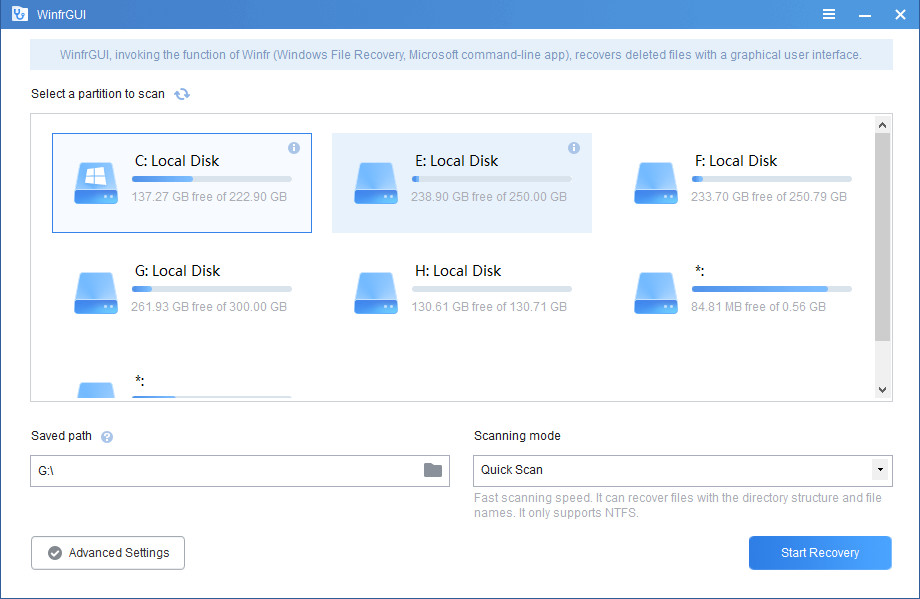
WinfrGUI is a free alternative to Windows File Recovery (Microsoft’s command-line file recovery application). You need to run some commands to recover your deleted files, which is a bit complicated for non-technical computer users.
WinfrGUI provides GUI and step-by-step guide to free you from complicated command lines and easily recover deleted files on Windows 10/11 with simple clicks.
WinfrGUI Key Features:
Two scanning modes are supported
- Quick scan can recover files with directory structure and filename under NTFS file system; deep scan can recover more files with lost directory structure and filename.
Recover all lost files
- Recover media files/office files/ZIP files etc. including JPEG//PDF/DOCX/MP3/EXCEL/ZIP etc.
Recover from where you lost files
- Recover lost Windows files from SSD/HDD/USB/memory card in Windows 11/10, NTFS/FAT/exFAT/ReFS.
Applicable scenarios
- Recover accidentally deleted files; recover files from formatted hard drives; recover files from damaged hard drives.
Compatibility and security
- Support Windows 10/11, NTFS/FAT/exFAT/ReFS.
To download: WinfrGUI 1.0.0 | 3.7 MB (freeware)
See: Screenshot | WinfrGUI website
 Get notified of all our software updates on Twitter at @NeowinSoftware
Report a problem with the article

Classic Media Player – Home Theater 1.9.21.2

EMDB 5.07

Comments are closed.