

by Alexandre Poloboc

With an irresistible desire to always get to the bottom of things and find out the truth, Alex has spent most of his time working as a journalist, presenter,… read more
Published on
The new Insider Preview build for Windows 11 Preview Channel (KB5016691) isn’t the only new software Microsoft released today.
Microsoft also released a cumulative update, which is actually a C version, for the Windows Server 2022 operating system in the form of build KB5016693 (Build 20348.946).
You should know that this new software brings improvements to Microsoft Defender for Endpoint, File Compression, and Storage Replica.
Additionally, we’re also looking at some long-awaited fixes in TPM and BitLocker, among others, as you’re about to see below.
What’s new in Windows Server 2022 build 20348.946?
Let’s start by saying that the tech company has stated that there are absolutely no known issues with this release, which is an added bonus.
However, users will likely come across one after testing this brand new Insider build for Windows Server 2022.
Let’s take a closer look at the release notes and find out what this new version of the software brings to the table:
- Improves Microsoft Defender for Endpoint’s ability to identify and intercept ransomware and advanced attacks.
- Compresses a file regardless of its size if you have configured Server Message Block (SMB) compression.
- Improves storage replication that occurs over low bandwidth or congested Wide Area Networks (WANs).
- Addresses an issue that prevents the Start Task API from working as expected for some applications.
- Addresses an issue that causes Kerberos authentication to fail. The error is 0xc000009a (STATUS_INSUFFICIENT_RESOURCES “There are insufficient system resources to complete the API”). This occurs when a client uses Remote Desktop Protocol (RDP) to connect to a device that has Remote Credential Guard enabled.
- Fixes an issue that causes ServerAssignedConfigurations be null in a few full configuration scenarios.
- Addresses an issue that prevents a private virtual local area network (PVLAN) from providing tenant and virtual machine (VM) isolation.
- Addresses an issue that delays a client’s acquisition of the Internet Protocol version 6 (IPv6) address for extended periods of time in an IPv6 environment.
- Addresses a known issue that causes Microsoft Edge to become unresponsive when using IE mode. This issue also prevents you from interacting with a dialog box.
- Addresses an issue that may generate error 0x1E when you shut down or restart a device.
- Addresses an issue that affects the installation of Microsoft Store apps when you have enabled the control flow app.
- Addresses an issue that prevents Microsoft Office App-V virtualized applications from opening or not working.
- Addresses an issue that may cause Windows Hello for Business certificate deployment to fail under certain circumstances after a device reset.
- Addresses an issue that degrades BitLocker performance.
- Fixed an issue that could prevent Windows from taking ownership of a Trusted Platform Module (TPM) device.
- Fixed an issue that could prevent a Windows device using BitLocker from working.
- Addresses an issue that causes the Resultant Set of Strategy tool (Rsop.msc) to stop working when processing 1000 or more “File System” security settings.
- Fixed an issue that could cause the Remote Desktop Session License to display a 60 minute disconnect warning after reconnecting.
- Addresses an issue that prevents the Settings application from working on server domain controllers (DCs) when accessing the Privacy > Activity history page.
- Addresses an issue that prevents devices from receiving an offer from Windows Update for the same extension driver when that extension driver is already installed without the base driver.
- Addresses a race condition that prevents the Local Security Authority Subsystem (LSASS) service from functioning on Active Directory domain controllers. This issue occurs when LSASS concurrently processes Lightweight Directory Access Protocol (LDAP) requests over Transport Layer Security (TLS) that fail to decrypt. The exception code is 0xc0000409 (STATUS_STACK_BUFFER_OVERRUN).
- Addresses an issue that affects finding a non-existent security ID (SID) from the local domain using a read-only domain controller (RODC). Search unexpectedly returns error STATUS_TRUSTED_DOMAIN_FAILURE instead of STATUS_NONE_MAPPED or STATUS_SOME_MAPPED.
- Addresses an issue that affects input and output in the Storport driver and may cause your system to become unresponsive.
What can I do if KB5016691 does not install?
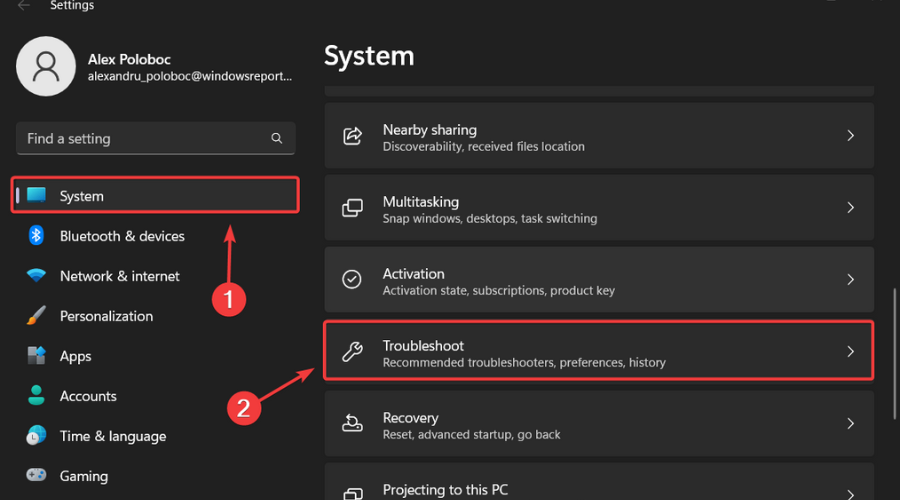
- Hurry To win+ I to access Settings.
- Select the System category and click Troubleshoot.
![w11 troubleshoot]()
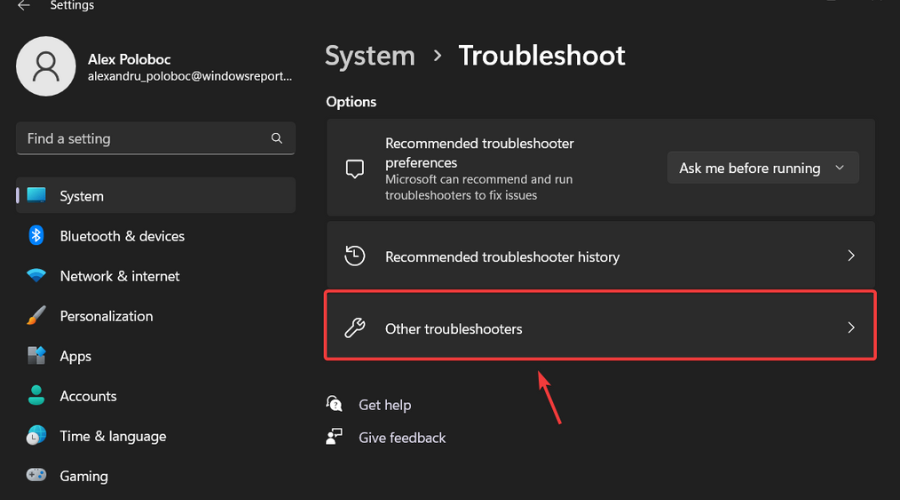
- press the Other convenience stores button.
![other windows 11 troubleshooters]()
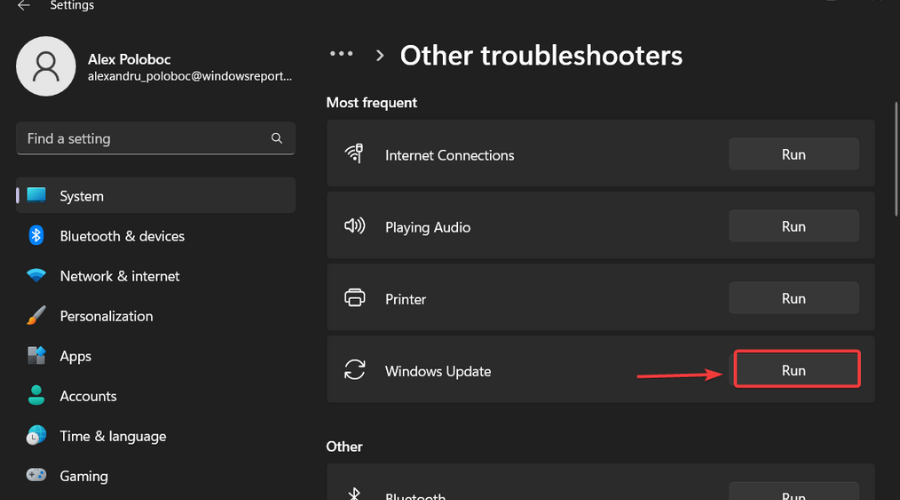
- press the To run button next to Windows Update.
![windows update troubleshooter]()
Here’s to you guys! Everything you can expect if you’re a beta channel insider. Leave a comment below if you’ve found any issues since installing this release.
Thanks!
Start a conversation

Comments are closed.