
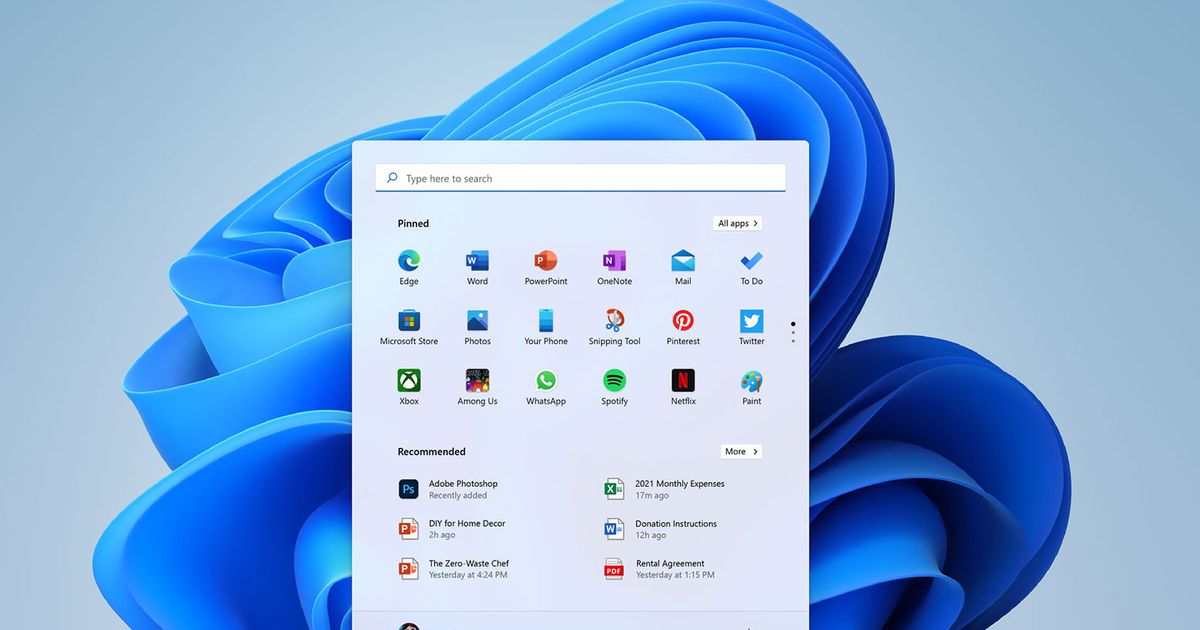

Microsoft just moved your Windows Start button. But don’t worry, you can roll it back.
The redesign of the iconic Windows menu, now in the center of the screen rather than the corner, is just one of many changes Microsoft announced Thursday for the next version of software that runs your home PC or the computer laptop that you have been assigned to use at work or school.
With Windows 11, arriving later this year, Microsoft is giving its trusty operating system a facelift and trying to make it more relevant in a post-pandemic world where we work and communicate differently. Microsoft’s Teams video chat service is built-in, and initially you’ll also be able to use some of the Android apps previously only available on phones and tablets.
This upgrade, the first new flagship version of Windows in six years, is a sign that Microsoft is on the defensive. It’s still by far the most popular laptop and desktop software, with Windows 10 used by some 1.3 billion people. But in recent years it has lost market share to computers running Google’s Chrome OS, especially in schools, and even Macs made by Apple, its longtime rival.
In the first quarter of this year, Windows fell to 75% of the global PC market from more than 80% in 2020, according to Linn Huang, an analyst at IDC. The drop is partly due to COVID-19 supply constraints on Windows PCs, but it also shows that Windows has a long-term challenge in attracting consumers beyond enterprise computing systems. Over the past decade, smartphones have become the most important devices in most people’s lives – and Windows doesn’t run on any of them.
Windows 11 has been tweaked to work better on touchscreen computers that double as mobile tablets. And under the hood, Windows 11 will also run on computers with a kind of processor called ARM, seen on mobile devices and used in Apple’s latest computers, which are more energy efficient and run cooler.
Even though Microsoft wants customers to love Windows, a large contingent probably isn’t interested in the new bells and whistles; they just don’t want Microsoft to break what’s already working.
Microsoft stuffed a lot into a 45-minute online launch presentation filled with hyperbole about making Windows feel “at home” and partly derailed by the challenges of streaming. So we’ve taken a step back and picked out the five most important things to know about Windows 11.
1. Move to the Start menu.
It’s the end of an era: the Start menu is no longer at the bottom left of your PC’s desktop.
The new Start menu sits in the bottom middle and lets you quickly see pinned apps, as well as a few recommended apps based on what you’ve used before. (Don’t worry though – if you don’t like it in the middle, there’s a setting that lets you move it to the corner.)
Windows 11 also comes with new productivity shortcuts, although they are basic. If you tend to have multiple apps and windows at the same time, you can hover over any window to reveal different options for arranging your screen. Maybe it’s two windows side by side, or one large window with a few smaller ones floating beside it. Click on the configuration you want and your windows will “snap” to that shape.
People who want to switch between desktops can also do so. Not only can you have different desktops for home, school, and work, but they’ll also follow you on any Windows 11 computer you use. Your different computers can sync to the cloud: leave work, open your laptop at home and your screen should be exactly as you left it: windows, tabs and all. The Start menu even saves your most recent files, so you don’t have to click to reopen them.
2. Windows app store gets Android apps.
For the first time ever, you can get Android apps on your Windows PC, which is a big plus if your favorite apps have clunky web versions like Instagram or no web versions at all, like Google Home. Now, Android apps will be downloadable from the Windows 11 app store, but you’ll need to go through a few steps. The Android apps actually come from a partnership with Amazon’s App Store (used by Amazon’s own Fire tablets), which you’ll need to sign in to separately with an Amazon account.
(Amazon CEO Jeff Bezos owns The Washington Post.)
How badly people want Android apps on a PC remains an open question. Past attempts to port Android apps to Windows have been technically tricky and largely unpopular. A partnership with Amazon to deliver Android apps could help, although Microsoft’s last collaboration with Amazon, when it combined its voice assistant Cortana with Amazon’s Alexa, was a flop.
The security implications of Android apps on Windows 11 are also unclear. Can Microsoft detect and stop any malware that might arrive hidden in Android apps? Microsoft said it couldn’t give answers yet because the companies are just beginning their partnership.
Microsoft is also trying to bolster its Windows app store by offering developers financial incentives not available on Apple’s rival app store. Apple has alienated developers taking significant cuts from in-app purchases revenue; Microsoft has announced that it will give developers 100% of their earnings in many situations.
3. Windows gets Live Update widgets – and its own News Feed.
Windows 11 also introduces a whole new information screen. A panel of so-called widgets, which you access by swiping from the left edge, makes Windows feel a little more like a phone or tablet – and will offer all sorts of new distractions. Widgets are like apps that include live updates, like weather, stocks, and your calendar. You can choose which ones you want, and Microsoft says it eventually hopes to include more from content creators.
(Longtime Windows PC owners may remember an earlier version of these called Microsoft Gadgets in the little-loved earlier version called Windows Vista.)
The new widget screen will also include its own news article feed, much like Facebook’s algorithm-generated news feed. Microsoft says it will choose the news it presents using artificial intelligence that learns your preferences from the types of stories you interact with most often in the widget.
4. Teams is integrated for video calls and chats.
For many of us, the go-to communication apps during the pandemic were Zoom and Slack. But Microsoft has also made inroads with its Teams service, which combines video conferencing and chat into one.
Microsoft is now integrating Teams directly into Windows 11. You’ll be able to contact and start chats with people right from the Start menu. If those people aren’t on Teams, you can text them instead, which seems… confusing? We’ll reserve judgment until we see how it works.
It’s a bold move for Microsoft. First, Teams could confuse people who have grown accustomed to Skype, another video chat and communications app also owned (and promoted) by Microsoft. Second, Microsoft has also been accused by Slack of using Teams for corporate bullying. Will Slack have the same ability as Teams to integrate directly into Windows 11?
“We are absolutely going to use Slack optimally on Windows 11,” Microsoft Vice President Yusuf Mehdi told us.
5. You can download Windows 11 as a free update later this year.
Think of it as Santa’s little improvement. Microsoft was a little squishy on the details, but a final build of Windows 11 should be available around the 2021 holiday season. It’ll be a free update for owners of Windows 10 PCs — at least newer ones who can. execute.
How will you know if your PC is fast enough? There are some hardware requirements, such as a newer processor, four gigabytes of RAM, and at least 64 gigabytes of storage. Microsoft has a PC check tool you can use.
And the good news is that Windows 11 is built on the same core code base as Windows 10, so older apps and drivers shouldn’t usually crash (as with the notorious Windows Vista).
Finally, what happens if you don’t upgrade? Microsoft says it will continue to support Windows 10 until October 14, 2025.

Comments are closed.